¶ CZ2768:Z-axis homing issue, may have an external disturbance
¶ Why This Message Appears
¶ Applicable Printer: i7
During Z-axis homing, external interference may cause vibration, which can falsely trigger the sensor. Common causes include:
Accidental contact with the printer, triggering the sensor
External vibrations causing abnormal sensor activation
The Hotend Heating Assembly is not securely fastened
The Hotend is not properly installed
Failure of the Toolhead strain gauge sensor
It is recommended to eliminate external interference and avoid touching the printer during the homing process while observing for any disturbances.
¶ How to Resolve the Issue
Check for external vibrations and place the printer on a stable surface (desk or floor)
Inspect the printer to ensure the Hotend and Hotend Heating Assembly are properly installed and secured
Replace the strain gauge sensor if necessary
Click “Retry” to allow the printer to automatically perform the homing process again. Do not touch the printer during this process and observe for any interference
¶ General Troubleshooting Steps
¶ Check for Motion Interference
Ensure there are no external vibrations
Make sure there are no objects on the Print Plate
Ensure there are no obstructions beneath the X-axis
Place the printer on a stable surface
Click “Retry” and allow the printer to perform the homing process again. Do not touch the printer during this process and observe for any interference.
¶ Check Hotend and Heating Assembly Installation
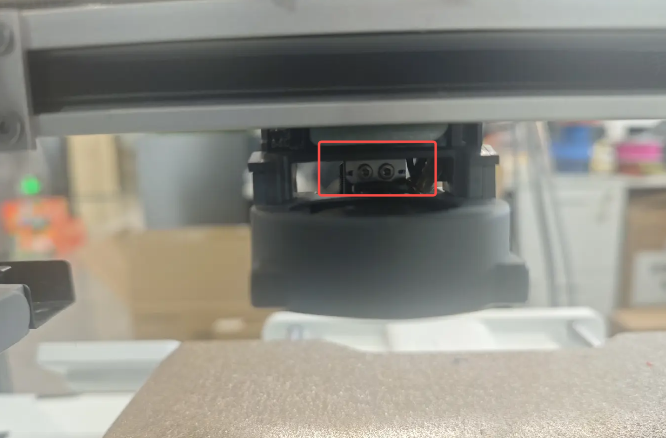
Prepare an H2.0 hex wrench (included in the accessory box),Tighten the two screws located above the Part Cooling Fan on the back of the Toolhead (turn clockwise)
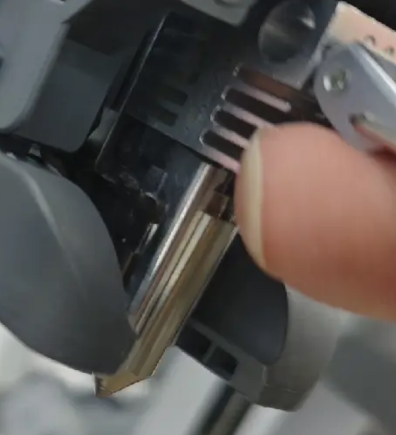
Inspect the Hotend installation to ensure it is properly seated and not tilted
Click “Retry” and allow the printer to perform the homing process again. Do not touch the printer during this process and observe for any interference.
¶ Re-Release the Stress on the Leveling Sensor to Eliminate Stress Interference
The Leveling Sensor is mounted on a metal bracket, which is secured to the Toolhead with screws. During tightening, abnormal residual stress may be introduced into the bracket, which can cause homing abnormalities. Loosening and re-tightening the Leveling Sensor can effectively resolve this error.
Remove the Toolhead front cover and the Quick-Release Hotend. You may manually lift the X-axis Assembly upward to the top position for easier operation.

Use a Hex wrench (H1.5) to loosen the four screws of the Leveling Sensor one by one. Loosen each screw by half a turn to one full turn only. Then, following the diagonal tightening principle, tighten the four screws again in the recommended order as shown in the image.
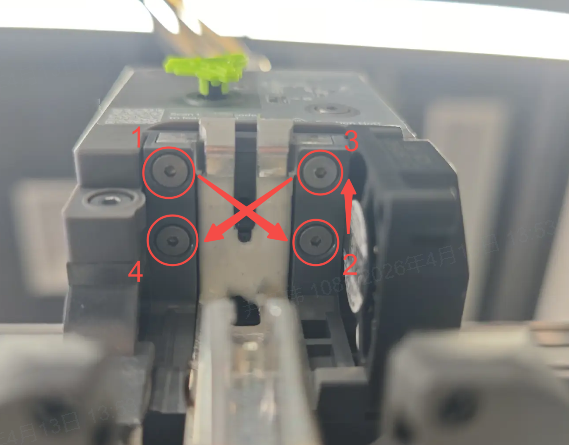
Reinstall the Quick-Release Hotend and the Toolhead front cover, then perform homing again to check whether the issue has been resolved.
¶ Replace the Strain Gauge Sensor
If the issue persists after completing the above steps, the strain gauge sensor may be faulty. You may need to replace it or contact SPARKX after-sales support for assistance.